Layoutr — lay out your room faster with AI.
Where Layoutr started
I originally built Layoutr for myself. I was about to move and wanted to know in advance what would fit in my new place. You upload a floor plan, set the scale and move your furniture around at true size until the layout works.
A lot has been added since that first version. There are people using the app regularly now, and some of them are paying subscribers. For me, reason enough to keep building Layoutr out. The biggest addition of the past month: two AI features that help you lay out your room.
Why AI?
One core value of Layoutr is letting you know as easily and quickly as possible: does this fit in my room? The AI is there to make that path shorter and simpler, nothing more, nothing less.
The AI takes manual work off your hands where it can, and thinks along when you are not sure how to best arrange a space. Faster and simpler where it can be, inspiration where you get stuck.
What the AI does
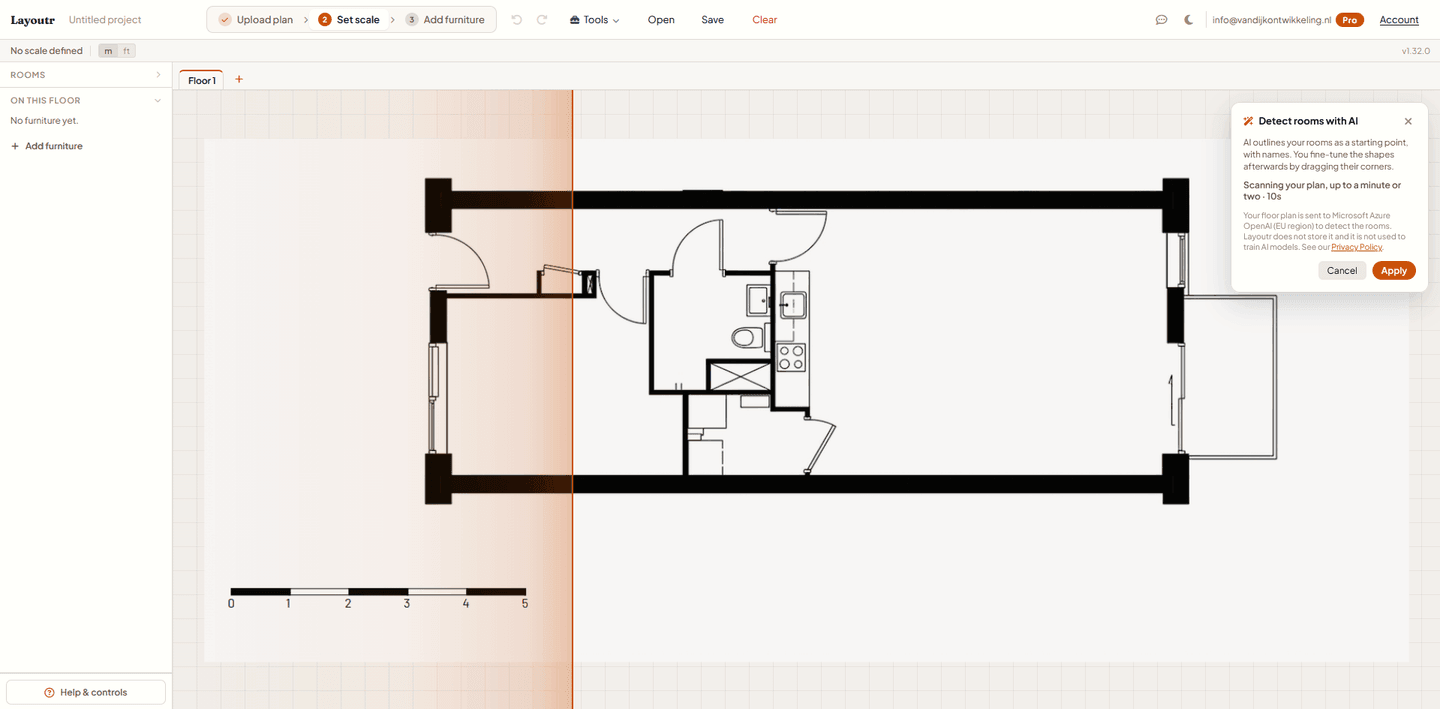
- AI room detection: You need drawn-out rooms to work without a floor plan or to use AI furnishing, which needs the exact room dimensions. Uploaded a floor plan image? The AI detects the rooms in it, so you do not have to draw them by hand. You fine-tune the result afterward.
- AI furnishing: Once you have rooms, tell Layoutr how you use one, for example “a bedroom for two with a reading corner”, and it suggests a complete arrangement at true size, built around your room’s real dimensions. Use it as a starting point or just for inspiration; every item stays editable.
- Manual control stays: Anything the AI detects or suggests, you adjust yourself afterward. The AI gives you a fast head start; you decide the final layout.
The core stays free
Layoutr’s core stays free. Uploading your floor plan, calibrating the scale, drawing rooms yourself and placing furniture: all of that works without AI.
The AI features run on credits. One credit is one AI action: a single room detection or a single furnishing suggestion. A Pro plan includes 50 credits per month, and if you need more you top up; those topped-up credits never expire. So the AI stays entirely optional: a fast head start, while you keep the final layout in your hands.
Privacy: what goes where?
Another core value of Layoutr is privacy. Your floor plans and layouts simply stay local in your browser; during normal use your project data never leaves your device.
The AI features are the only exception, because they need something to work with. Room detection sends the floor plan you uploaded. The furnishing suggestions send your room’s dimensions and layout, the furniture already placed, your short description and sometimes a cropped section of your floor plan.
That data is processed by Microsoft Azure OpenAI, purely to generate your result. It is not stored at Layoutr and, under the Azure OpenAI terms, not used to train models or shared with other customers. Nothing is ever sold.
What I expect from it
I hope to achieve two things with this step. First, conversion: the AI features are part of Pro, giving people on the free version a concrete, tangible reason to upgrade.
Second, discoverability. More and more people search literally for an AI floor planning tool or an AI floor plan. By actually building those features, Layoutr becomes relevant for those search terms too, in Google as well as in AI search engines.
Frequently asked questions about the AI features
- What AI features does Layoutr have?
- Layoutr has two AI features. AI room detection draws the rooms and walls for you from your uploaded floor plan, so you no longer have to do it yourself. AI furnishing gives you layout ideas: you describe how you want to use the room and the AI suggests an arrangement.
- Are the AI features free?
- Layoutr’s core stays free and works without AI. The AI features run on credits: one credit is one AI action. A Pro plan includes 50 credits per month, and you can top up if you need more; topped-up credits never expire.
- Do I need AI to use Layoutr?
- No. The AI features are optional and mainly speed up the initial work. You can still lay out any floor plan entirely by hand, exactly as before.
- Does room detection work on every floor plan?
- The AI works best on clear floor plans with well-defined walls. You can always adjust the detected rooms and walls by hand afterwards.
- What happens to my data when I use the AI?
- During normal use your project data stays local in your browser. Only the AI features send data: room detection sends your uploaded floor plan, and the furnishing suggestions send your room dimensions, the placed furniture, your description and sometimes a cropped section of your floor plan. That processing runs through Microsoft Azure OpenAI, solely to generate your result; it is not stored and not used to train models.
Try it yourself
AI in your own software?
AI where it actually helps.
The same call I make for Layoutr, I make for clients too: use AI where it takes work off your hands, not because it can. Want to explore that for your own software? I am happy to think it through with you.
Get in touch